Quick answer: to cancel your TV licence, log in to the official TV Licensing website with your licence number if you pay by Direct Debit or paid in full, or contact TV Licensing directly if you pay by cash or a payment card. Cancel the licence first, then cancel your Direct Debit with your bank afterwards. If you have at least one full month left on the licence, you may also qualify for a refund.
Cancelling your BBC TV licence is quicker than most people expect. Cancelling the Direct Debit and cancelling the licence are two completely different things, though, and doing only the first one leaves you still on record as needing a licence. This guide walks through the actual steps, in the right order, so you cancel it properly the first time.
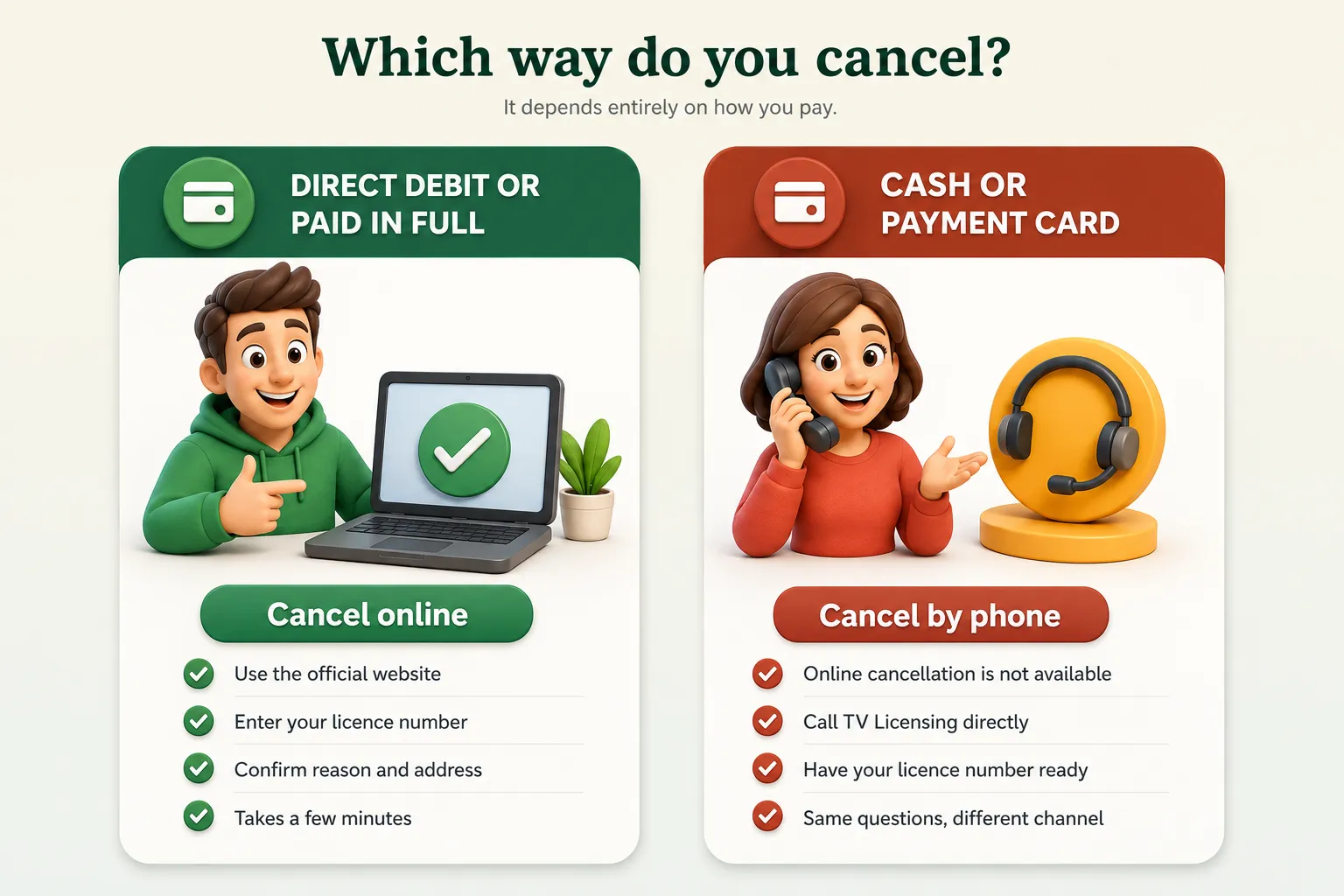
If you pay by Direct Debit or paid the whole year upfront, you cancel your TV license online. If you pay by cash or a TV Licensing payment card, you need to call. Either way, cancelling your Direct Debit at the bank is a separate step that comes after, not instead of, cancelling the licence itself.
Before You Start
Two things make this faster. First, find your TV licence number, which appears on any letter or email TV Licensing has sent you, or in your online account if you have one set up. Second, work out whether you are likely to be eligible for a refund, since that changes which part of the process applies to you. Broadly, you may be owed money back if you will not need the license again before it runs out and you have at least one complete month left on it. If that describes your situation, keep it in mind as you go through the steps below, since the refund is usually handled as part of the same cancellation rather than as a separate claim.
|
Action |
What it actually does |
|
Cancel the licence |
Ends the licence itself and updates your address on TV Licensing’s records |
|
Cancel the Direct Debit |
Stops future payments only, does not end the licence |
|
Apply for a refund |
If approved, the licence is cancelled automatically as part of it |
|
Move house |
Cancel or transfer the licence, refund possible up to two weeks before you move |
How to Cancel Your TV Licence Online
If you pay by Direct Debit or paid for the year in one go, you can cancel online in a few minutes. This is the route for you.
Go to the official cancellation page
Use TV Licensing’s own website rather than a search result or a third party site, since some scam pages imitate the cancellation form.
Enter your licence number and address
You will be asked to confirm the address the licence covers, and your current address if you have moved.
Give a reason for cancelling
Common reasons include moving house, no longer watching live TV or iPlayer, a bereavement, or becoming eligible for a free or discounted licence.
Submit and check for a refund outcome
If you are owed money back, this is usually confirmed as part of the same process, and your licence is cancelled automatically once the refund is approved. When you cancel your BBC TV licence this way, the refund and the cancellation happen together rather than as two separate requests.
Cancel the Direct Debit with your bank
This is a separate step and it matters. TV Licensing does not cancel your bank instruction for you unless you are moving onto a free or blind concession licence, covered below.
Some people report being asked to phone rather than complete the process fully online, even when paying by Direct Debit. If that happens, it is not a sign anything has gone wrong. It usually means TV Licensing wants to confirm a detail on your account before processing the cancellation, and calling completes it just as effectively.
What Happens After You Cancel
Cancellation submitted
Your request is logged against your licence number, whether done online or by phone.
Cancellation confirmed
TV Licensing updates your address on its records and stops treating it as licensed.
Refund processed, if eligible
Paid by cheque or bank transfer, once TV Licensing has worked out the amount owed.
Stop the Direct Debit
This step is yours to do, with your bank, and TV Licensing will not do it for you.
If You Pay by Cash or a TV Licensing Payment Card
You can cancel Telly licence online only if you pay by Direct Debit or paid for the whole year at once. If you pay using a TV Licensing payment card at a PayPoint outlet, you need to contact TV Licensing directly by phone to cancel, since that route is not handled through the website. Have your licence number ready when you call, along with the reason for cancellation, since you will be asked the same questions the online form would have asked.
The Mistake That Catches Almost Everyone
This is the single most important thing in the whole process. The safest way to stop TV licence Direct Debit payments without a problem is to cancel the license first, because cancelling your Direct Debit at your bank on its own does not cancel your licence. TV Licensing has confirmed this directly: stopping the payment only stops the money leaving your account. Your address stays on record as licensed, or if the licence lapses unpaid, it moves onto the same unlicensed list covered in our guide to TV Licensing letters, and the reminder letters start.
Cancelling only the Direct Debit
Cancelling the licence properly
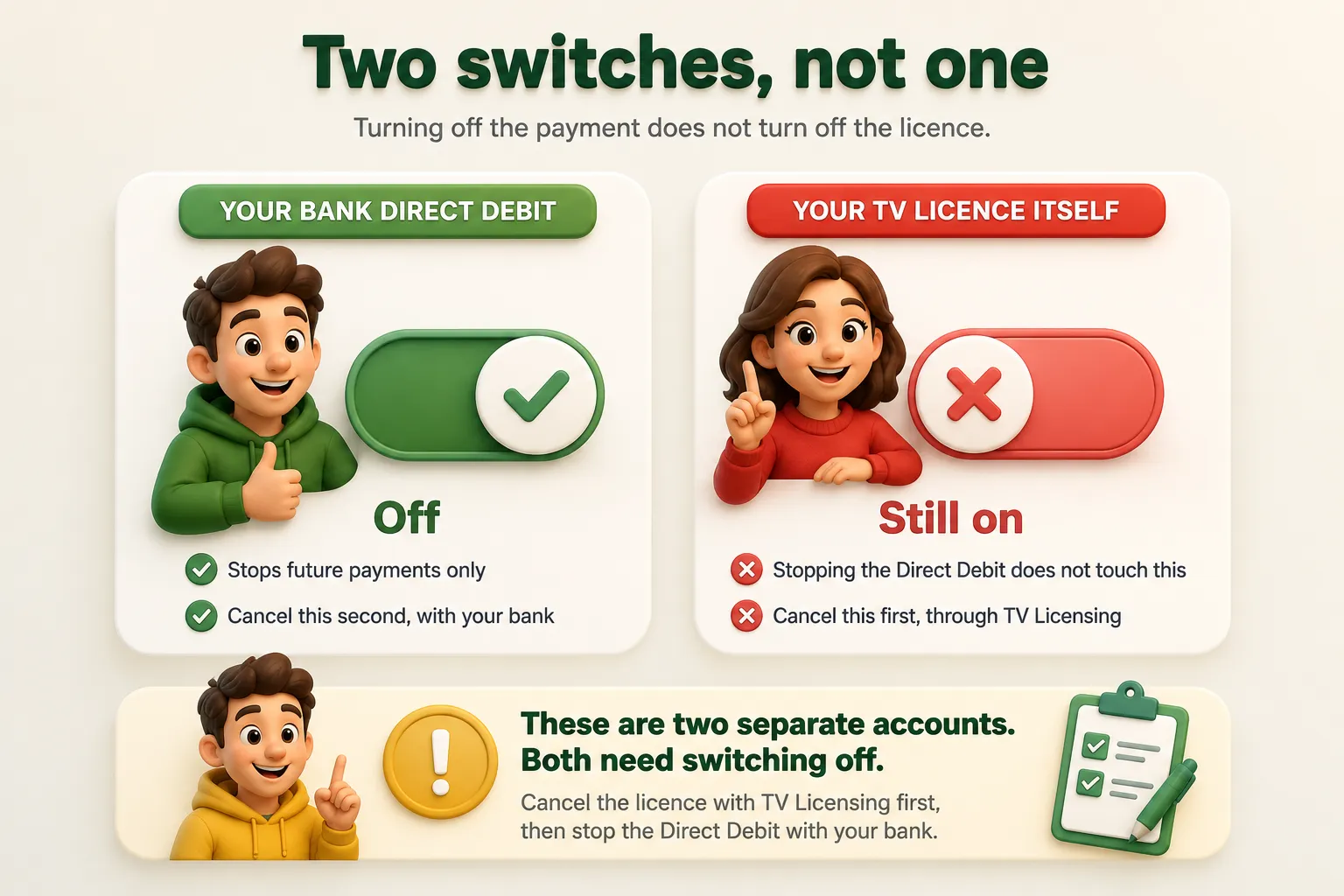
The correct order is always: cancel the license first, through the website or by phone, then stop the TV licence Direct Debit with your bank once that is confirmed. Doing it the other way round is what leaves people paying nothing but still technically holding an active, unpaid licence.
Refunds
Cancelling and getting money back are related but not identical. You may be eligible for a refund if you will not need the licence again before it expires and you have at least one complete month left unused on it. If TV Licensing approves a refund, your licence is cancelled automatically as part of that decision, so you do not need to submit two separate requests. Refunds are typically processed within 21 days and paid by cheque or directly into your bank account.
If you are not eligible for a refund, perhaps because there is less than a month left on your licence, you can still go ahead and cancel it. You simply will not have anything paid back. This page covers cancellation itself; the fuller detail on how refund amounts are actually calculated deserves its own explanation, which we cover separately.
Cancelling Because You Are Moving House
Moving is one of the most common reasons people cancel, and it has one useful detail worth knowing: you can request a refund up to two weeks before you actually move, rather than waiting until you have left. This means the cancellation and any refund can be sorted out in advance instead of adding it to your moving day admin.
If you are moving to a new address where a licence already exists, you do not need a second one. If the new address has no licence and you will still watch live TV or use iPlayer there, you need a new licence for that property, since a licence covers an address, not a person.
Switching to a Free or Blind Concession Licence
If you are cancelling because you have become eligible for a free licence, most commonly through Pension Credit at 75 or over, or because you qualify for the blind concession, you do not need to separately cancel your Direct Debit. TV Licensing cancels it for you automatically as part of processing that application, and refunds any money you are owed at the same time. This is one of the few cancellation routes where the usual two step process collapses into one. Full detail on who qualifies and how much these licences cost is covered in our TV licence cost guide.
Common Mistakes When Cancelling TV Licence Cover
Cancelling the Direct Debit first
This leaves the licence itself active on paper while the payments stop, which is the exact situation that generates reminder letters.
Assuming a refund happens automatically
A refund is only triggered if you qualify and it is confirmed as part of the cancellation. Check the outcome rather than assuming.
Cancelling too early before moving
If you still need the licence at your current address for a few more weeks, cancelling too soon leaves that period unlicensed.
Not confirming nobody will watch live TV
Cancelling while someone in the household still watches live television or iPlayer turns a simple admin task into a genuine legal risk.
Frequently Asked Questions
How do I cancel my TV licence?
If you pay by Direct Debit or paid in full, cancel online through the TV Licensing website using your licence number. If you pay with cash or a TV Licensing payment card, you need to call TV Licensing directly.
Does cancelling my Direct Debit cancel my TV licence?
No. Cancelling the Direct Debit with your bank only stops the payments. Your licence and your address stay on record as needing one, so the reminder letters continue. You have to cancel itself through TV Licensing separately.
Can I get a refund when I cancel my TV licence?
You may be, if you will not need the licence again before it expires and you have at least one full month left on it. If a refund is approved, your licence is cancelled automatically as part of that process.
How long does it take to cancel a TV license?
The online cancellation itself takes a few minutes. If you are also owed a refund, TV Licensing aims to process and pay it within 21 days, by cheque or bank transfer.
What happens if I cancel my licence and still watch TV?
Watching live television or BBC iPlayer at an address with no licence is a criminal offence, whether or not you previously held one. Only cancel once you are certain nobody at the address will watch live TV or use iPlayer.
Do I need to cancel my TV licence when moving house, or can I transfer it?
Neither is compulsory in every case. If you are moving to an address that will need a licence, you can often transfer the existing one to the new address instead of cancelling and buying a fresh one. If the new address is already licensed, or you no longer need one, cancelling is the right route.
Can I watch Netflix after cancelling my TV licence?
Yes. Netflix and other on demand streaming services do not require a TV licence, whether or not you hold one. The only things a licence covers are live television on any channel and BBC iPlayer in any form.
Will inspectors visit after I cancel Telly licence?
It is possible but not routine. Cancelling does not guarantee zero future contact, since TV Licensing occasionally checks addresses that have declared they do not need a licence. A visit is uncommon rather than automatic, and officers still have no right of entry without your permission or a warrant.
Can I cancel my TV licence over the phone?
Yes. Phone cancellation is the only route if you pay by cash or a TV Licensing payment card, and it is also available as an alternative if you pay by Direct Debit or paid in full, even though online is the faster option for those payment types.
Can I cancel my TV licence if I have Sky?
Yes. A TV licence is separate from any Sky, satellite, or cable subscription. Having a Sky box does not by itself require a licence. What requires one is watching live television on any channel, including through Sky, or using BBC iPlayer. If you use Sky only for on demand content and never watch live channels, cancelling your licence is fine.